Install guide · v1.9.7

Install PrivacyPal in minutes

PrivacyPal is live. Install in minutes and start governing the AI running in your business: approve tools, control data access, redirect unauthorized AI, all from one dashboard. Zero configuration required.

Downloads

Pick your platform

Windows 11

Run PrivacyPal on your PC with a full installer. Optimized for the Windows 11 experience.

64-bit .exe installer Windows 11
Install for Windows

PrivacyPal-Setup-1.9.7.exe

Or install via command line: PowerShell
>winget install PrivacyPal.AI

macOS

Native builds for Apple Silicon and Intel Macs. Pick the architecture that matches your chip.

.dmg installer M1–M5+ macOS 13+

Not sure which? Open the Apple menu → About This Mac and read the Chip line: anything M-series is Apple Silicon.

PrivacyPal-1.9.7-{arm64,x64}.dmg

Before you install: close other AI apps if the installer prompts you. PrivacyPal hooks in at the system edge for full coverage.

Step by step · Windows

Installing on Windows 11

01

Download the installer

Grab PrivacyPal-Setup-1.9.7.exe above, or skip the browser entirely and run winget install PrivacyPal.AI from PowerShell.

02

Run the setup

Run the installer as a user with permission to install applications. SmartScreen may ask you to confirm the publisher. Accept to continue.

03

You're protected

PrivacyPal installs silently and begins protecting the moment it's active: every AI app on the machine, zero configuration required.

Step by step · macOS
Installing on macOS

Drag, open, approve

Three quick steps from .dmg to full coverage on any Mac, Apple Silicon or Intel.

01 · Drag to Applications

Open the .dmg and drag PrivacyPal to your Applications folder.

02 · Pass Gatekeeper

On first launch Gatekeeper may block the app. Right-click PrivacyPal in Applications and choose Open, then confirm.

03 · Grant permissions

Approve any privacy or accessibility permissions PrivacyPal requests: that's what lets it govern AI at the system edge.
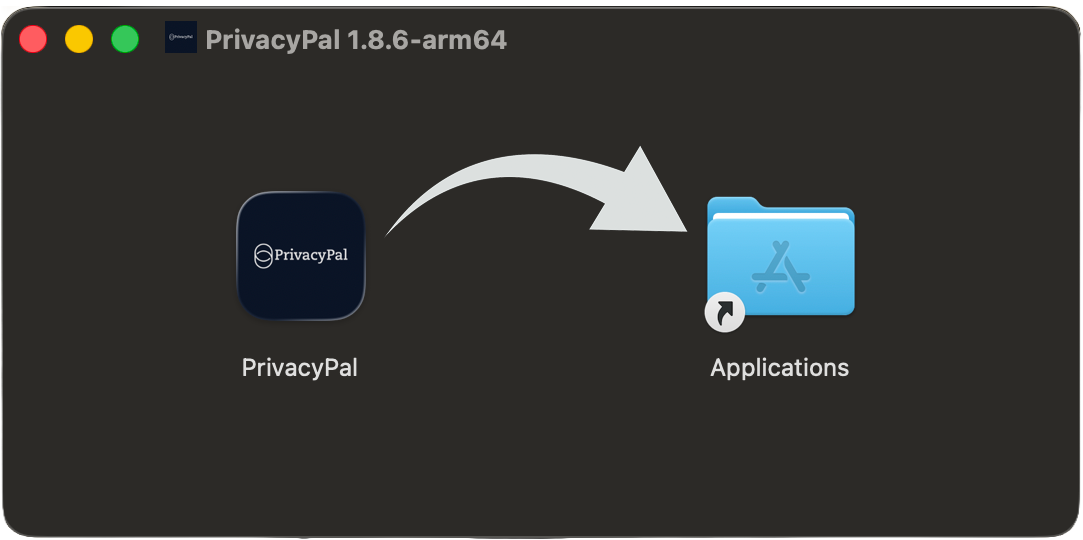
PrivacyPal installer for macOS: drag to Applications
From our founder

Watch why we built PrivacyPal

Before you install, hear it from the source. Co-founder & CEO Jason Melo walks through the problem every AI-hungry team hits (sensitive IP and PII flowing into LLMs) and how PrivacyPal's on-device Privacy Twins govern every AI app, copilot and agent without blocking a single user.

  • The problem: your team is already pasting sensitive data into AI
  • The mechanism: Privacy Twins, explained in plain language
  • The result: security teams become enablers, not blockers
Skip to downloads
Get started

Install once. Protected everywhere.

From download to governed AI in minutes, across every AI app, copilot and agent on the machine. Zero configuration required.