For parents

The calm control room for AI in your home

Parent HQ is one warm screen that answers the three questions that matter: what AI are my kids using, is their identity safe, and how are they doing? And when you want to change something, it is one tap, applied in realtime.


A mother and daughter working together at a desk, smiling
A boy focused on his homework
New AI approvedapplied to Leo's laptop instantly
Weekly digest ready2-minute read, every Sunday

Realtime control

Change your mind. Watch it apply.

Every control in Parent HQ takes effect on your kids' devices the moment you tap it. No sync delays, no "takes effect after restart," no IT degree required.

Approve & block AI tools

Green-light the AI you trust per child. Anything unapproved is blocked and redirected to a safe alternative, with a friendly explanation instead of a scary error.

Homework mode

School-day windows where AI helps with learning and skips the distractions. Set it once per child; adjust from your phone when plans change.

The never-share list

Your home address, school names, the little one's name, medical details. Put them on the list once and PrivacyPal keeps them out of every AI conversation.

Wellbeing Signal early access

A gentle mood trend per child, computed on their device from how they talk to AI. You see the weather, never the words, and get a nudge when the forecast shifts.

Answer Guard early access

What the AI says back gets checked on the device: age-right for their stage, and hidden manipulation like prompt injection blocked before it ever reaches your kid.

Family Memory

Read what AI remembers about each child in plain language. Keep the useful, erase the rest forever with one tap. Erase means erase, even mid-conversation.

Parent HQ · in your pocket

A Sunday digest, not a Sunday chore

Most weeks you will not open Parent HQ at all. A two-minute digest lands on Sunday: what your kids explored, what got protected, and one thing worth talking about at dinner. Effortless means effortless.

Only interrupts when it matters

A blocked tool, a flagged answer, a wellbeing shift. Otherwise, silence. No notification spam, ever.

Both parents, one HQ

Share access with a partner or co-parent. Same view, same controls, no arguing with the settings.

Realtime when you want it

Open the live view any moment: what is running now, on which device, and what PrivacyPal just protected.

R Rivera familySunday digest · Aug 9 live
This week
14AI study sessions

Maya leaned on ChatGPT for history. Leo discovered Gemini for his volcano project.

Protected
31identity details swapped

Nothing personal reached an AI provider this week.

Worth a chat

Maya seemed frustrated with math on Thursday. Maybe ask about the fractions test over pancakes.

Under the hood

The engine is already protecting hundreds of companies

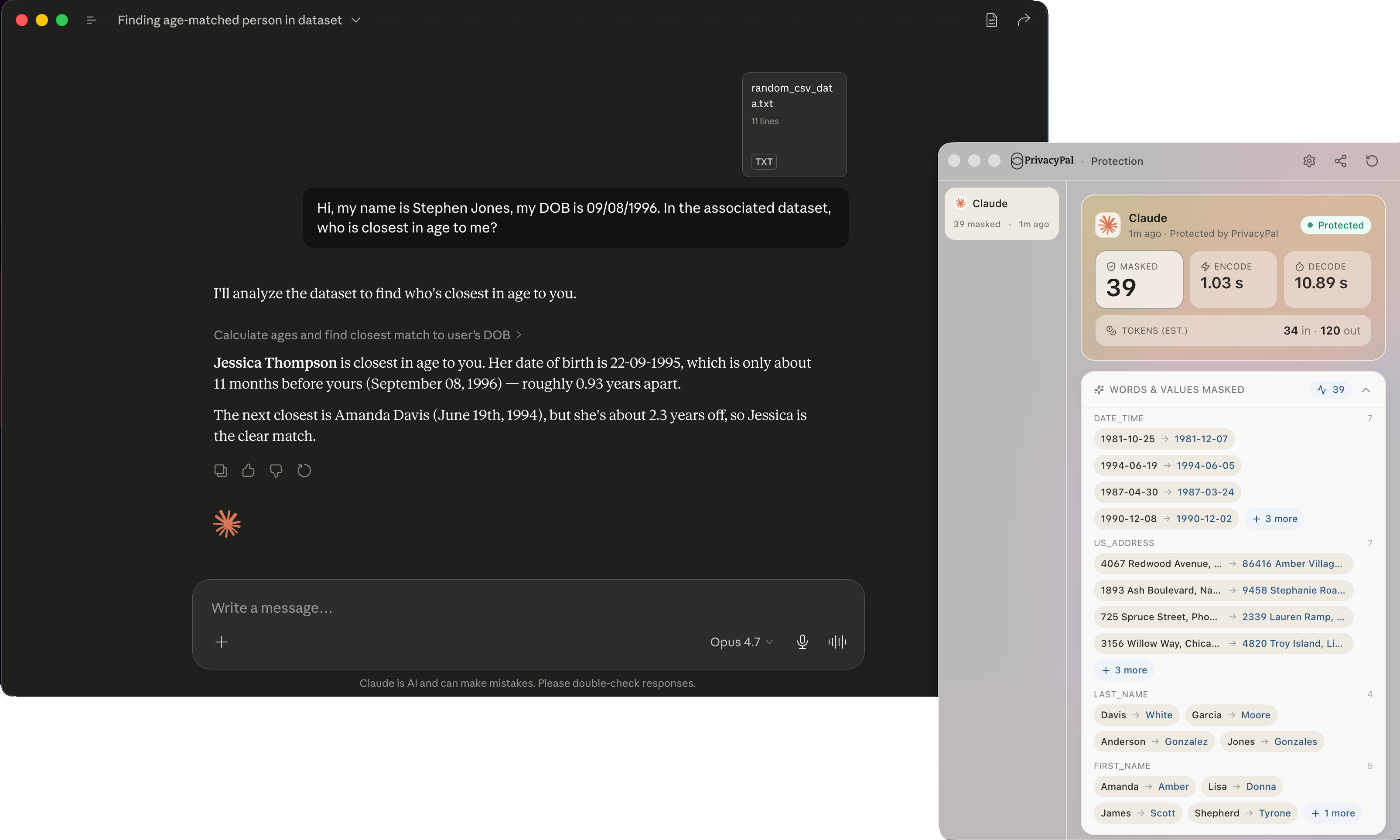
Parent HQ is the family face of PrivacyPal's shipping product: the same on-device interception, the same Privacy Twins, the same private memory vault. These are actual screenshots from the product today.

Actual PrivacyPal screenshot: realtime activity feed of protected items
Realtime activity feedactual product screenshot
Actual PrivacyPal screenshot: protection running inside a Claude chat
Protection inside a live AI chatactual product screenshot

Family-specific screens on this page are design previews of what early access families are helping us finish.

Founding families

Be the parent with the keys

Early access families get Wellbeing Signal and Answer Guard first, and a direct line to the team building them.